Lost? Need help? Ask anything here.

How to: Post Avi with Android without Downloading

How to: Post Avi with Android without Downloading

Postby Cilencio Cerbera » Mon Mar 01, 2021 8:48 am

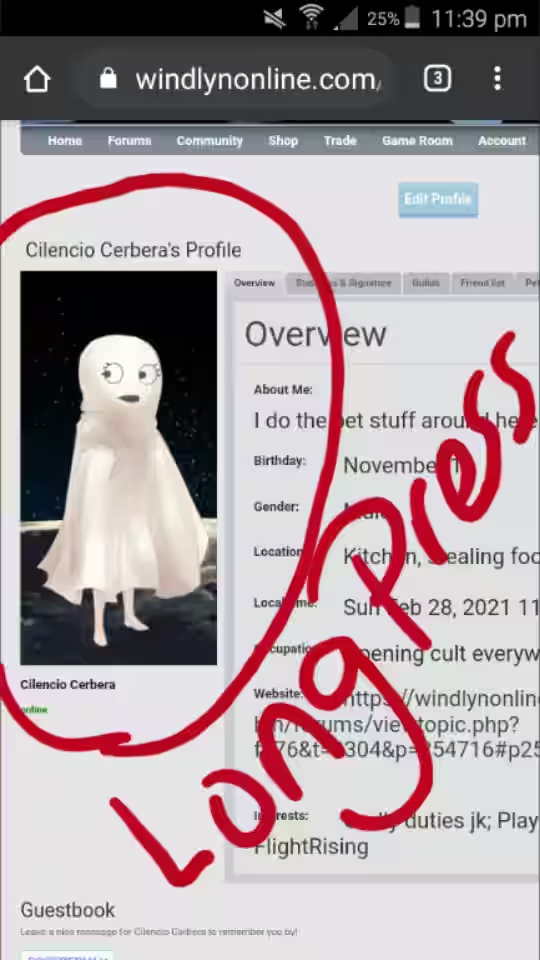
1) Go to whichever page with your avatar pic. Then put your finger on it, press it for a very long time.

Image


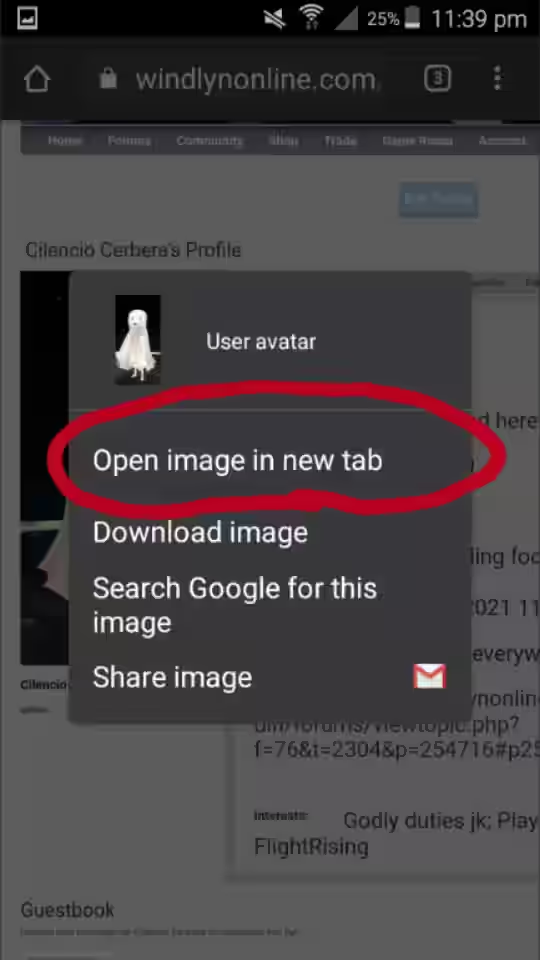
2) You should see this pop out. Now press 'Open image in new tab'.
Image


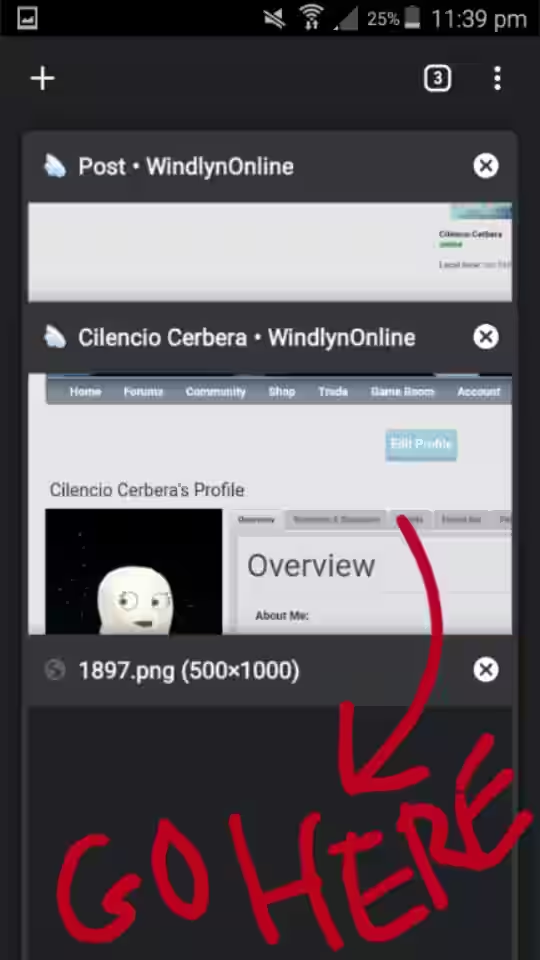
3) A new tab will be opened. Now go there.
Image


4) You should see this. Go to the link area and press it.

Image


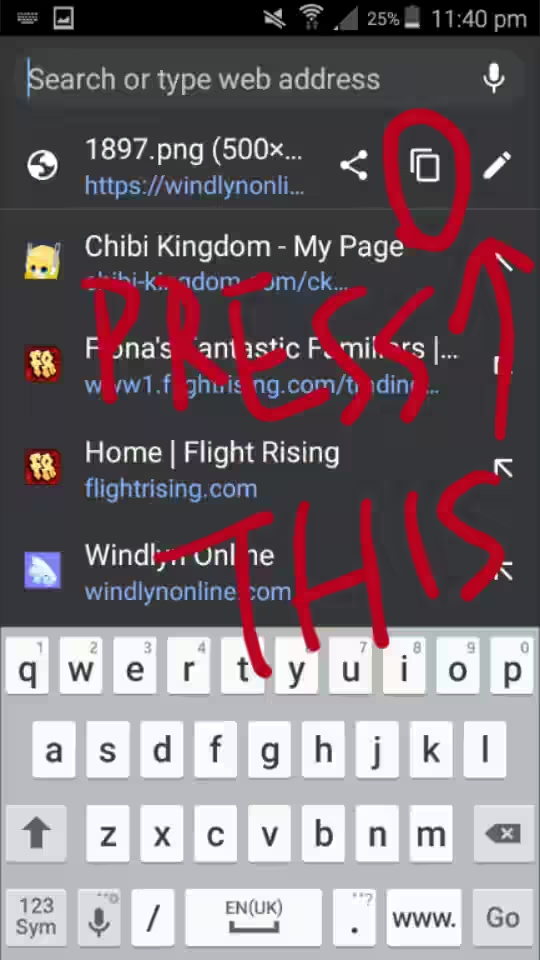
5) Now press the symbol circled in red, to copy image link.
Image


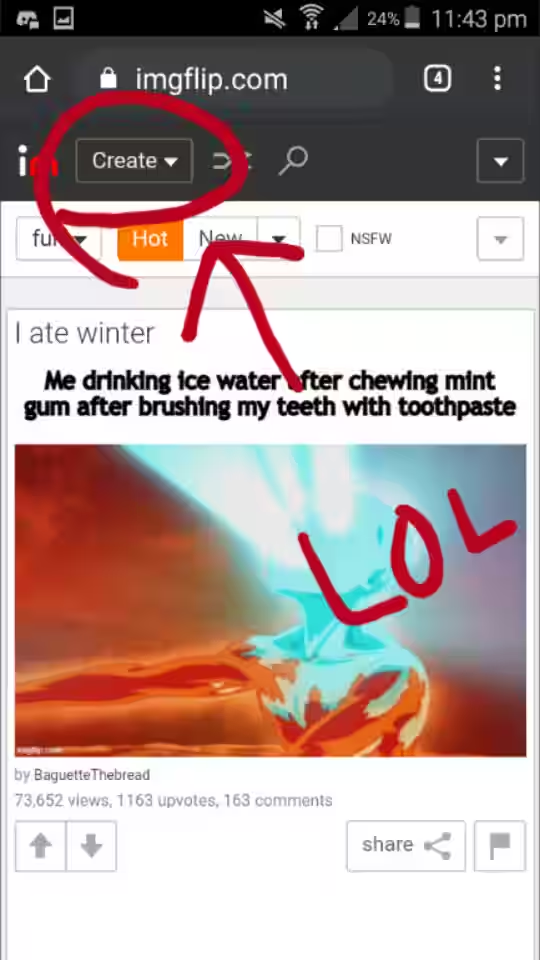
6) Now go to imgflip.com because imgur.com is shetty to mobile users, as it requires you to download the app in order to use it. Anyway, press 'Create'.
Image


7) This would appear. Now press 'Make a Meme'.
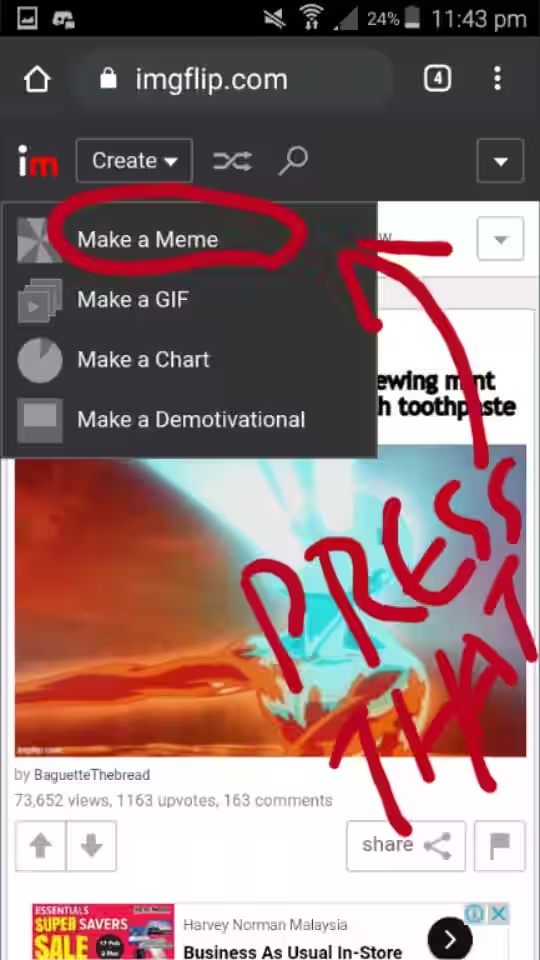
Image


8) You gonna see some random meme template, no worries. Scroll down and press 'Upload new template'.
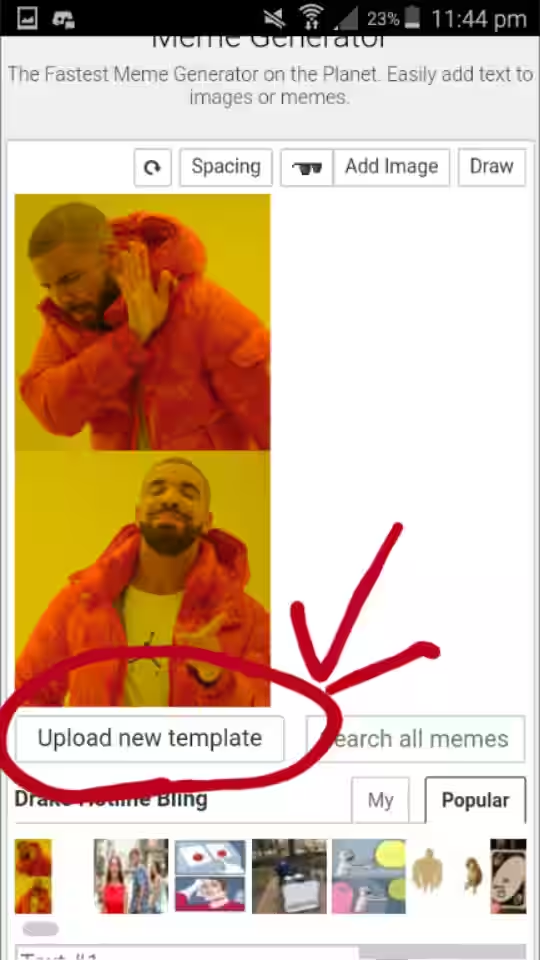
Image


9) Paste your copied image link here.
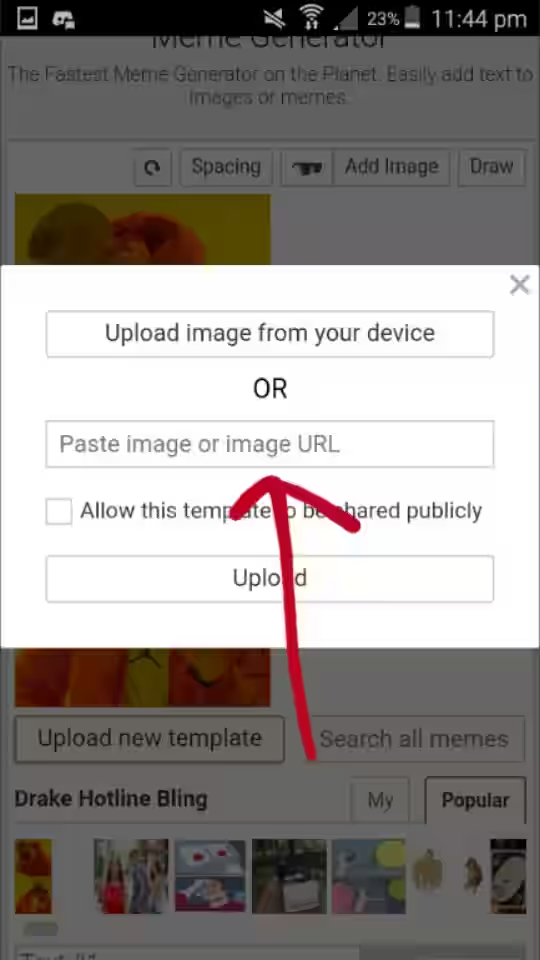
Image


10) Your image will load automatically if your internet is fast enough. Then click 'Upload'.
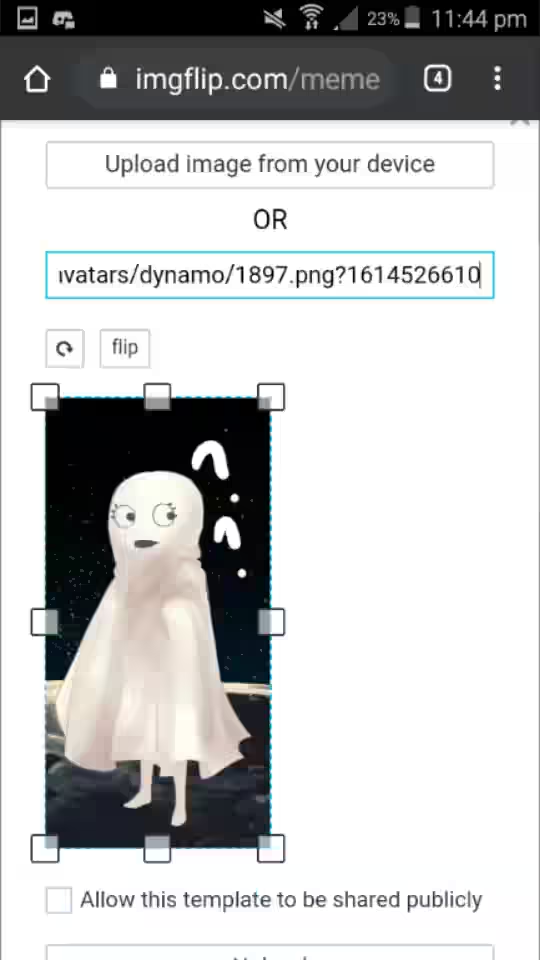
Image


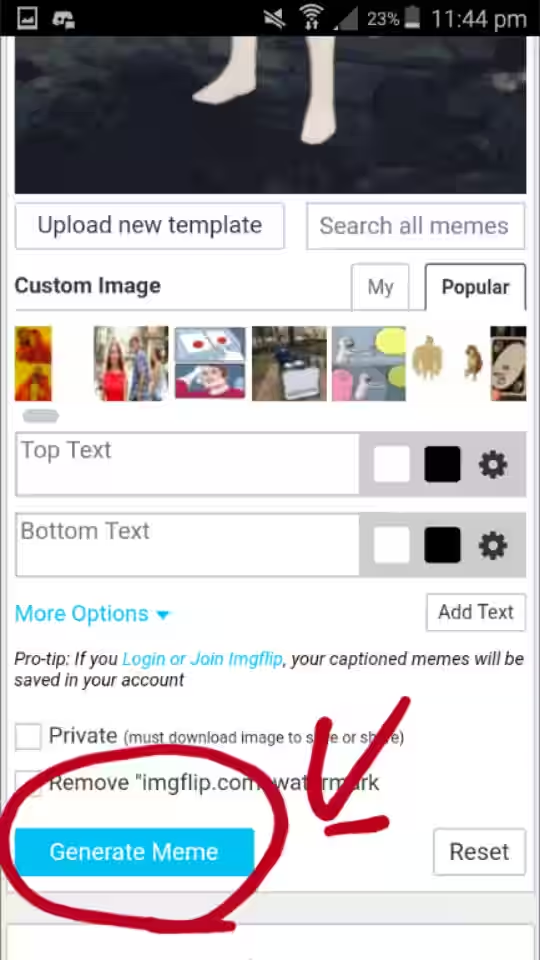
11) You should be seeing this. Now scroll down.

Image


12) Click 'Generate Meme'.

Image


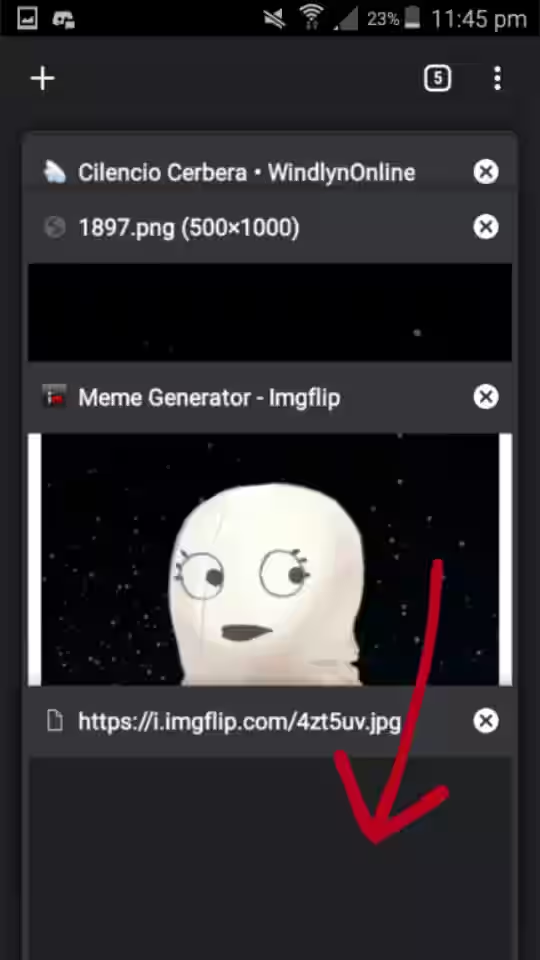
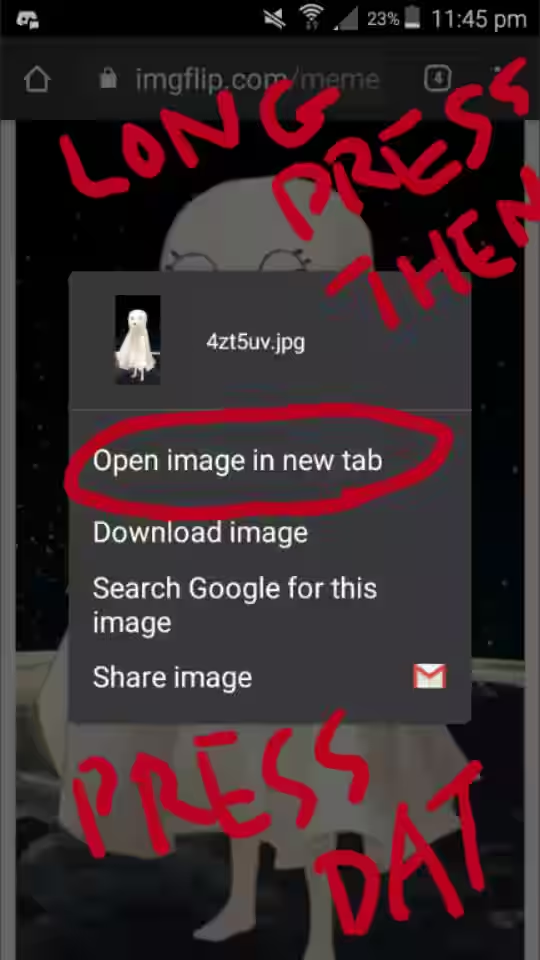
13) Your image has been successfully uploaded. Now, long-press on the image until this pops out. Then press 'Open image in new tab'.
Image


14) A new tab will be opened.

Image


15) Go to the new tab. Click the link area.

Image


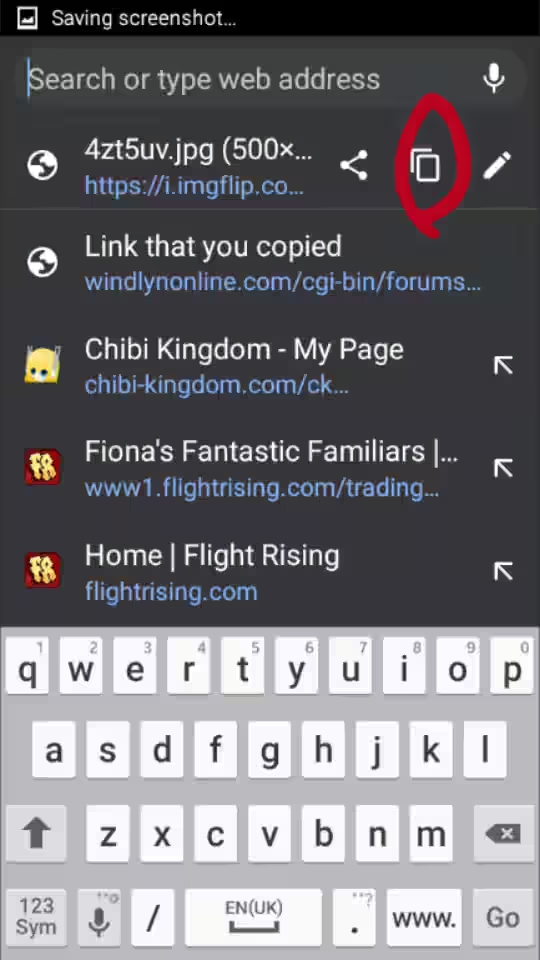
16) Press the symbol circled in red to copy your image link.
Image


17) Now go to whichever thread you want and press the [ Img ] button.
You should see this code:
Code: Select all
[img][/img]


18) Paste your image link in-between the code:
Code: Select all
[img]IMAGE LINK HERE[/img]

It should look something like this, for example:
Code: Select all
[img]https://forkimgurlol.png[/img]


Make sure the image link ends with .png or .jpeg or .gif.

User avatar


Local time: Wed Sep 23, 2026 4:21 pm


Re: How to: Post Avi with Android (Pictures Included)

Postby Lemon Cheesecake » Mon Mar 01, 2021 9:07 am

WOW! This is an AMAZING Tutorial!! Thank You for the time this must have taken CC!
User avatar


Local time: Wed Sep 23, 2026 1:21 am


Re: How to: Post Avi with Android (Pictures Included)

Postby Cilencio Cerbera » Mon Mar 01, 2021 10:49 am

10-ish mins yuh
Welcome!

Uploading the pics to Discord server and getting the image link via Discord is faster than imgflip, saved up more steps.
User avatar


Local time: Wed Sep 23, 2026 4:21 pm


Re: How to: Post Avi with Android (Pictures Included)

Postby npixelz » Sun Oct 24, 2021 2:17 am

Alrighty
User avatar


Local time: Wed Sep 23, 2026 3:21 am


Currently seeking event items
Minecraft guild
Owner of many titles
Creator of many forum games
The Fairy Garden is my main place, but you'll also find me in other hangouts
Lastly, much love to everyone, and remember; Positive Mental Attitude!
Keep being awesome
:L_Wing: :heart: :R_Wing:

Re: How to: Post Avi with Android (Pictures Included)

Postby Lemon Cheesecake » Sun Oct 24, 2021 5:15 pm

And it seemed to have worked! Great job posting your image in the Pokemon avatar thread, npixelz!
User avatar


Local time: Wed Sep 23, 2026 1:21 am


Re: How to: Post Avi with Android (Pictures Included)

Postby npixelz » Mon Oct 25, 2021 2:47 am

Ty! It turned out I had forgot to subscribe to this thread!
User avatar


Local time: Wed Sep 23, 2026 3:21 am


Re: How to: Post Avi with Android (Pictures Included)

Postby npixelz » Sat Jul 04, 2026 5:03 am

Oh noes


Img.flip no longer works
User avatar


Local time: Wed Sep 23, 2026 3:21 am


Re: How to: Post Avi with Android (Pictures Included)

Postby Cilencio Cerbera » Tue Jul 28, 2026 10:54 am

npixelz wrote:Oh noes


Img.flip no longer works


Good thing u told me, fixed + new link: https://imgto.link/free-image-hosting

This one allows 'Copy and Paste' pics on android and PC without the need to download pics or copy any links.
User avatar


Local time: Wed Sep 23, 2026 4:21 pm


Re: How to: Post Avi with Android without Downloading

Postby galled » Tue Jul 28, 2026 12:58 pm

Oh cool! Welcome back, CC!
User avatar

Server Administrator
online

Local time: Wed Sep 23, 2026 1:21 am


Image
~Windlyn Daydream by Mouse

Windlyn is so fun,
Windlyn is so grand,
So come on everyone,
All across the land,
Come and join us now,
In this awesome site,
We will show you how,
Talking through the night.
~npixelz


Re: How to: Post Avi with Android (Pictures Included)

Postby npixelz » Wed Jul 29, 2026 2:09 am

Cilencio Cerbera wrote:
npixelz wrote:Oh noes


Img.flip no longer works


Good thing u told me, fixed + new link: https://imgto.link/free-image-hosting

This one allows 'Copy and Paste' pics on android and PC without the need to download pics or copy any links.

How does it work? It doesn't seem to work for me


Also ty
User avatar


Local time: Wed Sep 23, 2026 3:21 am


Re: How to: Post Avi with Android (Pictures Included)

Postby galled » Wed Jul 29, 2026 8:56 am

npixelz wrote:
Cilencio Cerbera wrote:
npixelz wrote:Oh noes


Img.flip no longer works


Good thing u told me, fixed + new link: https://imgto.link/free-image-hosting

This one allows 'Copy and Paste' pics on android and PC without the need to download pics or copy any links.

How does it work? It doesn't seem to work for me


Also ty


Did you try the new first post going step by step?
User avatar

Server Administrator
online

Local time: Wed Sep 23, 2026 1:21 am


Re: How to: Post Avi with Android without Downloading

Postby npixelz » Tue Aug 04, 2026 2:22 am

Isn't that the old post?
User avatar


Local time: Wed Sep 23, 2026 3:21 am


Re: How to: Post Avi with Android without Downloading

Postby galled » Tue Aug 04, 2026 7:43 am

npixelz wrote:Isn't that the old post?


CC updated it for the new service.
User avatar

Server Administrator
online

Local time: Wed Sep 23, 2026 1:21 am


Re: How to: Post Avi with Android without Downloading

Postby npixelz » Wed Aug 05, 2026 2:01 am

Looks the same as before to me


Either way I have just tried it and it says it can't because it has a "html" file
User avatar


Local time: Wed Sep 23, 2026 3:21 am


Re: How to: Post Avi with Android without Downloading

Postby galled » Wed Aug 05, 2026 7:44 am

npixelz wrote:Looks the same as before to me


Either way I have just tried it and it says it can't because it has a "html" file


You're missing step 2, 3, 4, or 5. html is not a picture.
User avatar

Server Administrator
online

Local time: Wed Sep 23, 2026 1:21 am


Next

Return to Help/Support

Who is online

Users browsing this forum: claudebot [Bot] and 0 guests